
The laptop battery is very important in the performance and portability of your device. With time, every battery becomes less efficient in holding power because they all wear out. When your laptop is no longer lasting as long as it did before or the battery suddenly goes dead, then it could be the battery. Knowing how to check laptop battery health will enable you to track battery performance and determine when you should maintain or laptop battery replacement.
This guide will provide your step-by-step instructions on how to check laptop battery health battery, interpret battery reports, and increase the life of your battery.
Table of Contents
What Is Laptop Battery Health?
Battery health refers to the state of the laptop battery relative to its original state. When a laptop is newly assembled, the energy capacity of its battery is called the design capacity. The actual capacity of the battery reduces as battery ages and experiences numerous charging cycles.
Battery health is typically determined by the ratio between the initial battery capacity and the present full charge capacity. A new battery usually runs at 100% health, but after months/ years of use, it decreases. To explain it, given a battery with a init capacity of 50,000 mWh and the current ability to store 40,000 mWh only, the battery is at about 80 percent of its original health.
Battery health monitoring matters as it aids in determining whether the performance problems can be connected to battery degradation. It also assists users to know laptop battery replacement.
Why It Is Important to Check Laptop Battery Health
Most laptop users observe that their battery life is shorter than it was before without understanding that the degradation of the battery is the reason. Knowing how to check laptop battery health can make you identify issues before they arise, and prevent the sudden termination of the computer.
A battery that is in poor health can run out of power even when the laptop is not in use. In other instances, the gadget suddenly turns off despite its battery indicator indicating that it still has some charge left. Regular battery health checks can be used to avoid these problems and guarantee stable performance.
Another use of battery health monitoring is to prolong your laptop battery. This is because by detecting issues early on, you can modify charging habits and settings to reduce battery degradation.
How to Check Laptop Battery Health in Windows
The best method to check laptop battery health is through the built-in windows battery report, which is the most precise and reliable. The given approach is compatible with Windows 10 and Windows 11 and will give you detailed data on battery performance.
Generate a Battery Report
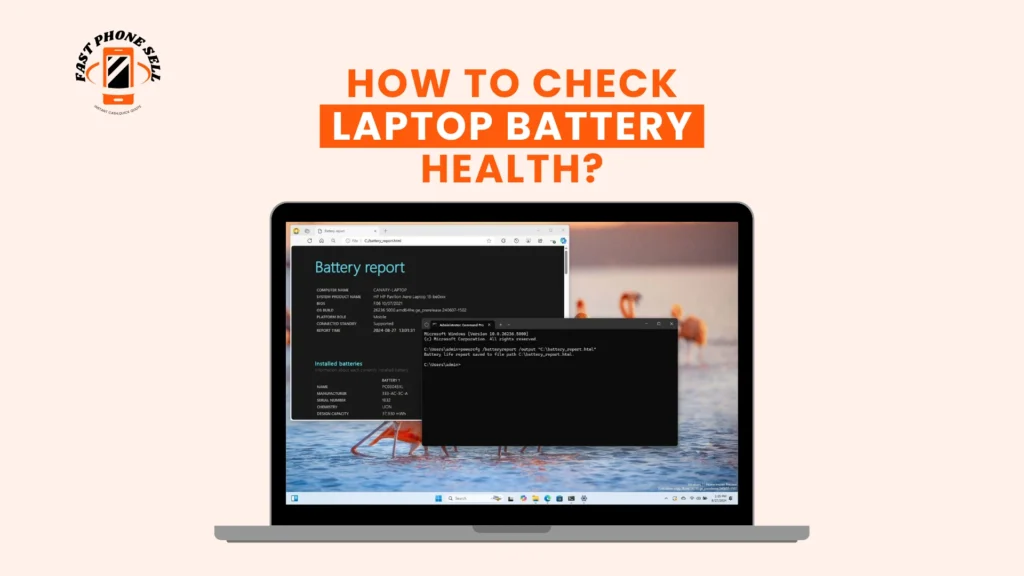
The first step would be to open the Windows search box and type Command Prompt. Enter the program as an administrator. After opening Command Prompt, enter the following command:
powercfg /batteryreport
Upon clicking Enter, windows will create a battery report file and show the location of the file. The report is typically stored in your user folder.
Open the file in a web browser to see detailed battery information. Your laptop battery has useful information about your laptop battery capacity history, usage data and battery wear, which is in this report.
This is regarded as the most appropriate method to check laptop battery health since it relies on official Windows diagnostics and delivers accurate measurements.
How to Read the Battery Report
The battery report is a report that many users create and are not completely aware of its meaning. It is necessary to learn to interpret the report to assess battery condition accurately.
Design Capacity
The design capacity is the initial battery capacity at which the laptop was purchased. This figure is used as a baseline to determine battery health.
To illustrate, a design capacity of 50,000 mWh means that the battery was made to hold that capacity of energy.
Full Charge Capacity
The full charge capacity indicates the amount of energy that can be stored in the battery at a given time. This figure gradually reduces with the age of the battery.
When the design capacity is substantially less than the full charge capacity, the battery is exhausted.
Calculating Battery Health
Estimation of battery health can be determined by obtaining full charge capacity divided by design capacity which is multiplied by 100.
Assuming that a battery has a design capacity of 50,000 mWh and a full charge capacity of 40,000 mWh, the battery health would be about 80 percent.
In the range of 80-100 percent, a battery having a health level is regarded as good. Once the battery health is lower than 70 percent, the performance typically reduces and the laptop battery replacement
Cycle Count
The number of cycles is the amount of times the battery has been discharged and charged. The majority of laptop batteries are made to sustain 300-1,000 charge cycles.
Unless the cycle counts are higher, it is often an indicator of older batteries with lower performance.
How to Check Laptop Battery Health Using Windows Settings
Through system settings Windows also offers some basic battery information. Even though this approach does not indicate exact health percentages, it can make users see an approximate battery performance.
Go to settings and find the power and battery section under system. Here you will be able to review battery usage history and be able to see the most power consuming applications.
This is an effective way of letting beginners have a rough idea of how their laptop battery performs, although it does not substitute comprehensive data offered by the battery report.
How to Check Laptop Battery Health in BIOS
The BIOS or hardware diagnostics menu is another useful method of check laptop battery health. Most laptop manufacturers provide integrated battery diagnostics, which is able to check battery status regardless of operating system.
Reboot your computer and use BIOS key when you are starting your computer. The key also depends on the manufacturer and is usually F2, F10, Delete or Escape. Entering the BIOS menu, go to the diagnostics or battery information menu.
Other laptops show battery messages like excellent, good, fair, or replace battery. Quick check on battery state is given by these messages.
The given method is particularly helpful in cases when Windows fails to work or when you simply need to verify battery health with hardware diagnostics.
Signs Your Laptop Battery Needs Replacement
Physical symptoms may also be signs of battery failure, even after you have check laptop battery health. These signs can be noticed early before they cause damage to your laptop and enhance reliability.
Rapid battery drain is among the most frequent warning signs. When you find your laptop runs out of power too soon even when it is not heavily used, this could be an indication that it is time to replace the battery.
Another prevalent problem is the unexpected shutdowns. A nonfunctioning battery can fail to give stable power and the laptop will switch off.
There are laptops that cannot operate without a charger. This normally indicates that the battery is no longer able to maintain a charge.
Battery damage can also be indicated by heat problems. An overheating battery can be one that is wearing out.
One of the most severe effects of battery failure is physical swelling. A battery pack that is swollen must be replaced as soon as possible, to prevent a piece of hardware becoming damaged, or pose a danger. In these instances, it is advisable to laptop battery replacement immediately.
When to Replace Your Laptop Battery
The battery lifespan of laptops also ranges between two and four years depending on the usage and the charging pattern. Batteries may suffer greatly in terms of life span due to heavy usage and high temperatures.
When the battery health is less than 70 percent, the battery might cease to deliver credible performance. Reduced run-time and frequent charging are frequent observations at this level by users.
When the battery cannot sustain normal use, replacing it in the laptop is the most appropriate solution. The laptop battery replacement will ensure the device has renewed mobility and enhanced performance of the laptop.
How to Improve Laptop Battery Health
Even though you cannot reverse battery wear, you can extend life of your laptop battery with proper care and reduce degradation.
Maintaining the battery charge at moderate rates will create less stress on the battery cells. Very high or very low levels of charge may cause wear to accelerate with time.
Another critical factor is heat management. Batteries need to be protected against high temperatures that destroy battery chemistry and lower battery life. On hard surfaces that enable the flow of air, use your laptop to prevent unsafe temperatures.
Battery life can also be affected by power settings. Diminishing the screen brightness and background app usage reduces energy usage and increases battery performance.
Another practice is to avoid constant charging. Always having the laptop plugged in may slow the battery performance over time. Periodical discharge cycles ensure stability of the battery.
These habits may considerably prolong battery life and prevent the necessity of timely laptop battery replacement.
Choosing a Best Battery Life Laptop
In the case you plan to upgrade your device, then choosing one of the best battery life laptops can enhance productivity and limit the number of times you have to charge your device.
Laptops which have larger battery capacities tend to offer a longer duration of use. The capacity of the battery is typically denoted in watt-hours or milliamp-hours, and higher values generally correspond to longer battery life.
Battery performance is also improved with energy efficient processors. Processors nowadays are made to provide high-performance at reduced power.
Solid-state drives are also more efficient since they consume less power compared to conventional hard drives. Good power management systems are also effective in prolonging battery life.
The best battery life laptop helps to select the best laptop that will allow you to take longer before the battery depletes.
FAQs About How to Check Laptop Battery Health?
How do I check laptop battery health on Windows 11?
The simplest method to check laptop battery health is to use Command Prompt to produce a battery report. To see battery capacity and battery usage history, open the file that is generated by typing powercfg /batteryreport.
What is a good laptop battery health percentage?
A battery health percentage of 80-100 percent is good. Once battery health is less than 70 percent, a laptop battery replacement can be required.
How long does a laptop battery last?
The average lifespan of a laptop battery is two to four years. The battery life varies based on the charging habits, the intensity of use and the temperature.
Can laptop battery health be restored?
Once the capacity is lost, the health of the battery is lost and cannot be recovered. Nevertheless, additional degradation can be slowed down by appropriate charging habits and temperature regulation.
When should I replace my laptop battery?
Your battery life should be changed when the battery health is less than 70 percent, battery life is short-lived, or the laptop abruptly closes. Timely replacement of the battery in the laptop can resume normal performance and enhance reliability.